

Download Class 11 Informatics Practices Worksheets for Open Office Calc
Review targeted practice sets for Class 11 Informatics Practices Open Office Calc. Built according to official educational guidelines for the 2026-27 academic year, these downloadable worksheets support daily revision and core concept reinforcement.
Access Open Office Calc Questions and Exercises
Access the complete worksheet PDF for Open Office Calc below. Regular practice with these targeted questions builds familiarity with standard exam patterns and helps secure higher marks in final Informatics Practices evaluations.
INFORMATION TECHNOLOGY
OPENOFFICE CALC
LAB – WORKSHEET
Write the steps to do the following:
1. Open a new spreadsheet in Open Office Calc and save it as InternetHours
The following table records the number of hours each student uses Internet in a week
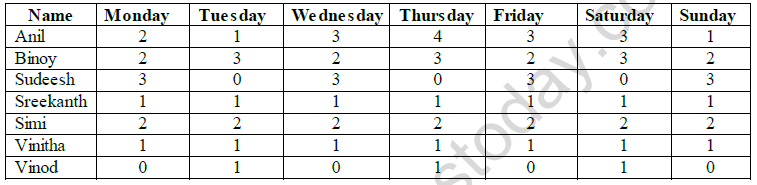
a) Type data into your spreadsheet.
b) Add another column titled “SlNo:”to the left of name column. Fill the number in SlNo column using auto fill feature.
c) Add another column titled “Total hours per user”. Using an appropriate formula, calculate the total hours each student used in the week.
d) Add another column titled “ Average hours used in a week”. Using an appropriate formula, calculate the average hours each student used in a week. The hours should be rounded to 1 decimal place.
e) Below the last student, add a row titled “Total hours per day”. Using an appropriate formula, calculate the total hours used each day of the week.
f) Add another row titled “Minimum hours used”. Using an appropriate formula, find the minimum number of hours used for each of the days.
g) Add another row titled “Maximum hours used”. Using an appropriate formula, find the maximum number of hours used for each of the days.
h) Select the cell wherever 0 is typed and put red colour for that cell
i) Count the number of students using the count() function.
j) Add a title “INTERNET USAGE” to your spreadsheet.
k) Save the spreadsheet with appropriate name.
Please click on below link to download CBSE Class 11 Informatics Technology Open Office Calc Worksheet
Free study material for Informatics Practices
Open Office Calc Practice Sheet and Solutions for Class 11 Informatics Practices
CBSE Practice Material: Class 11 Informatics Practices Open Office Calc
Access structured practice worksheets for Open Office Calc designed in alignment with the latest CBSE curriculum for Class 11 Informatics Practices. These printable problem sets help students build accuracy and prepare effectively for school tests.
NCERT-Aligned Questions and Solutions
Each worksheet is structured around standard CBSE textbooks, allowing students to check their working steps and correct mistakes early in their revision.
Next Steps in Your Exam Preparation
Wrap up your chapter revision by testing your knowledge against standard question formats. Everything on our platform is provided free of charge.
FAQs
You can download the teacher-verified PDF for CBSE Class 11 Informatics Technology Open Office Calc Worksheet from StudiesToday.com. These practice sheets for Class 11 Informatics Practices are designed as per the latest CBSE academic session.
Yes, our CBSE Class 11 Informatics Technology Open Office Calc Worksheet includes a variety of questions like Case-based studies, Assertion-Reasoning, and MCQs as per the 50% competency-based weightage in the latest curriculum for Class 11.
Yes, we have provided detailed solutions for CBSE Class 11 Informatics Technology Open Office Calc Worksheet to help Class 11 and follow the official CBSE marking scheme.
Daily practice with these Informatics Practices worksheets helps in identifying understanding gaps. It also improves question solving speed and ensures that Class 11 students get more marks in CBSE exams.
All our Class 11 Informatics Practices practice test papers and worksheets are available for free download in mobile-friendly PDF format. You can access CBSE Class 11 Informatics Technology Open Office Calc Worksheet without any registration.