

Official Class 7 Computer Science Revision Material: CBSE Class 7 Computer Science HTML Lists Notes
Access comprehensive revision notes for HTML Lists using the CBSE Class 7 Computer Science HTML Lists Notes. Designed to align with the 2026-27 academic syllabus for Class 7 Computer Science, these concept summaries help students streamline their exam preparation and review complex topics efficiently.
Chapter-wise Concept Summaries: HTML Lists
Navigate directly to the revision notes for HTML Lists using the digital viewer below. Each summary is structured to highlight high-weightage sections, allowing students to instantly access critical definitions and focus on core exam topics.
TABLES IN HTML:
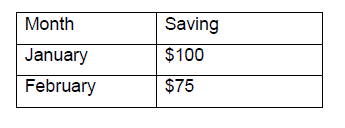
HTML tables allow web authors to arrange data like text, images, links, other tables, etc. into rows and columns of cells. The HTML tables are created using the <table> tag in which the <tr> tag is used to create table rows and <td> tag is used to create data cells.
Example: Create the following List in HTML
<html>
<head>
<title>
Table in html
</title>
</head>
<body>
<table>
<tr>
<td>Month</td>
<td>Savings</td>
</tr>
<tr>
<td>January</td>
<td>$100</td>
</tr>
<tr>
<td>February</td>
<td>$75</td>
</tr>
</table>
</body>
</html>
1. Table Border : We add border option in <table> tag i.e.<table border=”1”>
2. Bordercolor: It specifies the color of the table’s border.
Syntax: <table border=3 bordercolor=red>
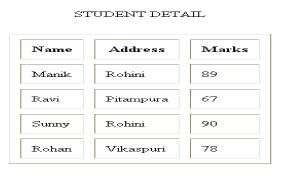
3. Cellspacing: It is the space between cells.
4. Cellpadding: It is the distance between cell border and the cell contents.
Syntax: <table border=3 bordercolor=red cellspacing=10 cellpadding=10>
5. Background: It is used to give image in the background. This attribute takes URL of the file as its value.
Syntax: <table background=”path”
6. Bgcolor: It is used to give colour in the background of the table.
Syntax: <table bgcolor=”red”>
7. Height and Width: These attributes are used to specify the height and width of the table in pixel
Syntax: <table height=200 width=300 >
ROWSPAN AND COLSPAN ATTRIBUTES OF TABLE TAG
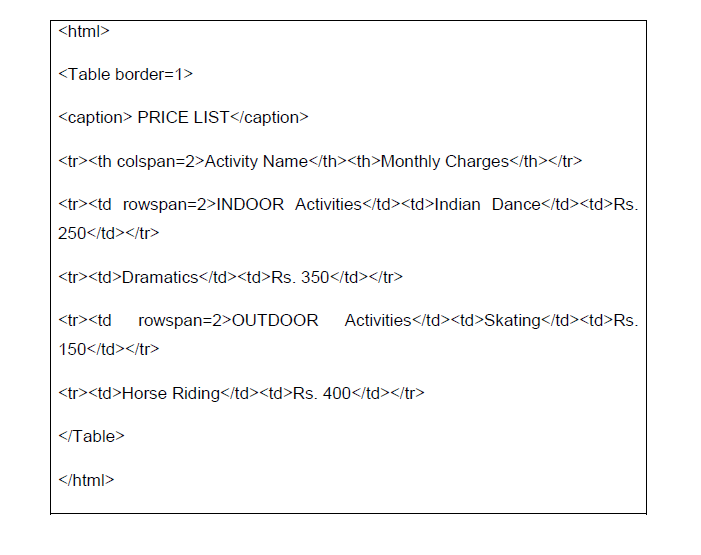
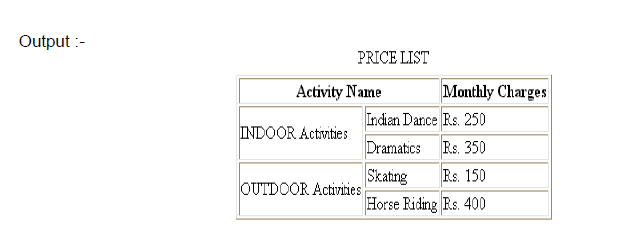
Stretching a cell over multiple rows or columns is refered to as spanning. Two or more adjacent rows can be combined together to form a single row using the rowspan attribute. Two or more adjacent columns can be combined together to form a single columns using the colspan attribute.
Please click the link below to download pdf file for CBSE Class 6 Science - Forms and Movements.
Download CBSE Revision Notes: Class 7 Computer Science HTML Lists
Download Chapter Summary: Class 7 Computer Science HTML Lists
Access structured revision notes for HTML Lists designed in alignment with the latest CBSE curriculum for Class 7 Computer Science. These summaries help clarify core themes and support effective daily study.
Concept Clarification for HTML Lists
Each chapter summary is structured around standard CBSE textbooks, allowing students to check their understanding and clarify complex ideas early in their revision.
Additional Study Resources for Class 7 Computer Science
Explore our broader library of printable assignments, chapter notes, and mock tests designed to support continuous revision and secure higher marks in CBSE assessments.
FAQs
You can download the teacher prepared revision notes for CBSE Class 7 Computer Science HTML Lists Notes from StudiesToday.com. These notes are designed as per 2026-27 academic session to help Class 7 students get the best study material for Computer Science.
Yes, our CBSE Class 7 Computer Science HTML Lists Notes include 50% competency-based questions with focus on core logic, keyword definitions, and the practical application of Computer Science principles which is important for getting more marks in 2026 CBSE exams.
Yes, our CBSE Class 7 Computer Science HTML Lists Notes provide a detailed, topic wise breakdown of the chapter. Fundamental definitions, complex numerical formulas and all topics of CBSE syllabus in Class 7 is covered.
These notes for Computer Science are organized into bullet points and easy-to-read charts. By using CBSE Class 7 Computer Science HTML Lists Notes, Class 7 students fast revise formulas, key definitions before the exams.
No, all study resources on StudiesToday, including CBSE Class 7 Computer Science HTML Lists Notes, are available for immediate free download. Class 7 Computer Science study material is available in PDF and can be downloaded on mobile.